Showing posts with label Augmented Reality. Show all posts

Wednesday, 8 July 2015

Gamification and the Annual Meeting of Court

UCS held it's Annual Meeting of the Court on 30th June.  Learning Services' involvement was to take part in the market place, where departments from around UCS can showcase their work to both staff and the wider business community.

Learning Services joined up with two other departments from within the Academic Services directorate, Student Support and Infozone.   To bring the stands together as one, it was decided that the stand should be interactive.  One of the areas that Learning Services has been exploring is 'Gamification' and the use of game mechanics to better engage with students around study skills/digital literacy workshops.

The technologies team (Elevate) with Learning Services has been developing a number of ways to build a Gamification framework, included in this framework is the development of Open and Digital Badges.

The stand, pictured below, hosted a number of posters displaying the current projects including an Augmented Reality heritage lottery funded project at Holywells Park.  Learning Services have introduced a number of technologies to improve the visitor experience.


To tie the different departments together a number of quiz questions were produced that were easily answerable from the information contained in the posters.  A selection of questions from each department created three quizzes.  The quizzes were loaded in iPads that made up part of the stand, visitors were asked to answer the quizzes, and a successfully completed quiz, would entitle that participant to an Open Badge.

The quiz statistics were shown live on the screen in the stand.  The Gamification and Open Badge development to date has led Learning Services to believe that badges should not be issued purely for attendance.  A requirement for some form of reflection or activity which then triggers the badge has a much better response.

The photograph below shows a number of attendees participating in a quiz:


The live statistics that were shown from the quizzes included number of attempts, average time taken and which questions were answered correctly/incorrectly.  A sample of these stats are shown below:


Please get in touch with Learning Services if you would like to discuss the use of Gamification in your course at  UCS.


Thursday, 26 February 2015

Holywells Park AR Project

IMG_8457.JPG
Holywells Park stables
The Elevate Team have been working closely with the Holywells Park Heritage Lottery Funded project run by Ipswich Borough Council.

The project is restoring some of the original features to the park as well as making more of its history available to the visiting public. We are supporting the project by offering our technical expertise around the use and creation of location aware activities.

We are developing two activities for the park and supporting the UCS students on a third. The two activities we are developing are both utilising augmented reality to bring the park to life. The first is a learning activity that augments video-based material over a static information board near the parks water feature.


The scenario is:

A park visitor has been and visited the information point and see the advertising material mentioning the hidden digital materials around the park, they have downloaded the required app to their smartphone.

They have walked to the water feature and looked at the information board, explaining some of the features of the pond, and what creatures they might see. They have noticed the icon on the board that indicates there is more to find out. They load the app on their smartphone and then they view the board on their phones screen.

The board then comes to life, with a video displaying over the board, and the video asks them if they would like to participate in a quick quiz. The person then touches the ‘yes’ button their phone screen. The video then displays some information and asks them a question about what they have just heard. Buttons appear on the screen and they can then choose an answer. The video will then tell them the if they are correct, and it will ask if they would like further information.

The second activity we are working on is a GPS based ‘Tree Trail’, where park visitors will be able to use their smart devices to view the park and find out about the trees and features around the park. If the visitor has the app open when they walk near one of these features they will be alerted by an audio introduction, when they can then find out more information.

Ipswich Borough Council are using a drone to video fly-throughs of the park. With the drone taking off and filming along the paths, these videos will be used to augment over another one of the information boards. Drones an area of interest to us as we believe they have great potential in other areas of working with the UCS Heritage team.

One thing we need to be careful of with the use of all this technology in an open space is, mobile signal and its strength. The new information point and cafe that are in the newly refurbished stables will have free wifi. We have spoken with the project manager about how they might extend this into the park. Extending the wifi is an option, but not one that will be 100% successful, to this end we undertook a mobile phone signal survey all around the park. Signal strength and speed tests were run at all points of interest in the park. These results were very encouraging as the area is now covered by 4G by two of the major operators, the others offered a fast 3G services.
IMG_8479.JPG
Mobile phone signal survey

We are very exciting to be working with Ipswich Borough Council on such an innovative project and we will update this blog over the coming weeks and months.


Friday, 13 February 2015

Graphics Design and AR

The Elevate Team were asked to speak to a group of level 5 Graphic Design students who are currently working through their 'Interactive Screen Design' module.

The idea was to introduce the students to augmented reality, most had heard the term, but very few had seen or used it.  +Aaron Burrell  and +David Mullett led the session, from what the Elevate team do and why, to the earliest thoughts of AR and the early 1950s inventions from Morton Helig.  All the way through to the work that the Elevate Team are doing, and what might come next.

The students were very engaged and one student in particular had already been thinking of using this technology in his project.

As well as looking at augmented reality, the students were also introduced to virtual reality and the idea of the Oculus Rift.  An area that Aaron believes will grow is the blurring of the lines between AR and VR, if the ability to connect a camera to a VR headset, allowing camera's view to be layered within the VR world.

To show an example of the VR headsets the students were shown how this can be done at a low cost, starter level with a head mounted smartphone holder (as seen below).


The team left the students very enthused and are hoping to return to speak with the students again soon.

Below is the slides from the session:


Friday, 11 April 2014

The 'Open' Augmented Web

In a recent blog post titled 'Getting Started with Augmented Reality in Education' I mentioned in my conclusion that one hope would be for an open standard.

I have read with great interest about the work that BuildAR are doing with their titled "Augmented Web".  BuildAR have been developing an open standards AR system, this means that you can embed AR into your website and use most new devices with the latest browsers on to access the AR material, rather than needing to download a specific app.  The browser also has no need for any plugins.

BuildAR says:
  • It's based on open web standards
  • It's built upon our open source awe.js library
  • It can support a wider range of 3D models
  • It can support a wider range of special effects
  • It can support 3D/spatialised audio
  • And best of all you can add it to your existing website
Below is an example of marker tracking running in standard production Chrome browser on a Nexus 4.


It's clear that in some ways, the Augmented Web is now where Mobile AR was back in 2010 and it's currently accelerating at an amazing pace. When you look at the interactivity and 3D capabilities, it's already equal to and in some cases beyond today's proprietary Mobile AR browsers. Furthermore, the fact that it runs in mainstream web browsers means it will rapidly be available to a much larger audience than proprietary Mobile AR ever was.
This development has huge potential and as BuidAR mention in the quote above there is a much larger available audience for AR content in an open web browser.

One current issue is for Apple users and the fact that Apple currently don't support the open WebGL standard that this new system.  There is growing need for open standards and the inclusion of WebGL on Apple devices.

Exciting times ahead, I will keep this blog updated of further developments.

Monday, 17 March 2014

What can we take from JISC RSC Eastern e-Learning Forum?

The latest JISC RSC Eastern e-Learning Forum was on the 14th March, and was hosted at UCS. The focus was on mobile learning, and in particular managing the roll outs of devices, and integrated learning designs.

The Elevate Team presented on Augmented Reality, Fad or Fab? The slides are below. The focus was on making people aware of the potential of augmented reality within a learning and teaching context, and explaining why it is likely to be a niche learning technology which adds significant value to the learning process within certain disciplines.

Interestingly, when I asked the audience (n = 24);
  • Have you previously accessed an augmented reality based activity? Yes = 74% of audience
  • Have you created an augmented reality aura (aurasma): 
    • Yes with Aurasma Studio (31%)
    • Yes with Aurasma App on Mobile (23%)
    • No (46%).
  • To what extent do you agree with the following statement: Augmented Reality as learning is a fad, it is a marketing dream and not relevant to the delivery of education
    • Strongly Agree - 4%
    • Agree - 39%
    • Unsure - 35%
    • Disagree - 13%
    • Strongly Disagree - 9%
This questioning was really interesting, as it illustrates the awareness and experience of Augmented Reality in the room was high, and a large proportion thought Augmented Reality might offer little in the long term as a learning technology. This questions were asked before I presented.


Two key ideas I took from the session where;

  1. Further develop my ideas of Opinion Leaders in terms of technology adoption through the need to identify these people and run awareness sessions for them.
  2. Looking at digital pens as a means of scaling the objective testing for summative and formative reasons, within the classroom. This would also allow us to include subjective questions within the test in a more sustainable model for staff compared to the current OMR.


Wednesday, 12 March 2014

Getting Started with Augmented Reality as a Learning Technology

Aims

The primary audience for this discussion are lecturers who are wishing to get started with Augmented Reality within their teaching and learning. The aims of the paper are to answer the questions;
  • What is Augmented Reality as a learning technology?
  • How is Augmented Reality being used in teaching and learning?
  • What do you need to consider if you wish to use Augmented Reality in your teaching?

Background

The Elevate Team work closely with staff and students to encourage, enable and evaluate the use of technology in learning and teaching at the University Campus Suffolk. In particular, to;

  • Help staff to integrate innovative technologies to enhance their teaching programmes
  • Share innovation and good practice through facilitating an active community
  • Evaluate the impact of enhancements on the student learning experience
Develop and pilot ways to enhance and develop learning through innovative technologies
The Elevate Team have been using the Aurasma Augmented Reality Software since 2011.  Aurasma uses advanced image and pattern recognition technology to identify and understand images and objects in the real world, blending them with rich interactive content such as videos and animations.

What is Augmented Reality?

“First and foremost, augmented reality is a set of technologies that seek to integrate the digital with the real. There are several versions and flavors of AR, but there are certain things that all of these have in common: displays, input devices, tracking, and computers.” - (Carmigniani et al (2011))

The goal of augmented reality is to add information and meaning to a real object or place. Unlike virtual reality, augmented reality does not create a simulation of reality. Instead, it takes a real object or space as the foundation and incorporates technologies that add contextual data to deepen a person’s understanding of the subject. For example, by superimposing imaging data from an MRI onto a patient’s body, augmented reality can help a surgeon pinpoint a tumor that is to be removed. In this case, the technology used might include headgear worn by the surgeon combined with a computer interface that maps data to the person lying on the operating table. In other cases, augmented reality might add audio commentary, location data, historical context, or other forms of content that can make a user’s experience of a thing or a place more meaningful.

Another term that can be used to describe augmented reality is ‘Visual Browsing’. A display is required to overlay the digital material on to the real world. With the fast moving world of technology and the pace that technology improves, both smartphones and tablets are now powerful enough to run augmented reality applications. When using a smartphone or tablet with augmented reality applications you can see why the term ‘visual browsing’ has been coined, you get a sense of visual interacting with your surroundings. You are able to ‘browse’ the available digital content that is displayed to you.

How is Augmented Reality being used in teaching and learning?

By its nature, augmented reality lends itself to a marketing tool. UCS’ first public use of the ‘AR’ was not in the field of teaching and learning, but as a project with the Marketing and External Relations department. UCS launched one of the first University prospectuses with embedded video content.

When researching what other institutions have been doing with augmented reality some of the first examples you will find are along the marketing lines, you need to dig deeper to find the practical examples being used in education.

To answer the question of how is augmented reality being used in other institutions we will draw upon three case studies.

Case Study 1: SCARLET Project, Mimas, University of Manchester

SCARLET stands for Special Collections using Augmented Reality to Enhance Learning and Teaching

http://teamscarlet.wordpress.com/category/mimas

“SCARLET demonstrates how Augmented Reality (AR) can bring educational resources to life by surrounding original materials with digital, online content. By adopting a mixed-team approach, with academics, librarians and technical staff, we’re helping UK universities gain knowledge and skills to enhance their collections using AR.” - Mimas website

The initial work of the SCARLET project was to work with the world-renowned St John’s fragment. The small fragment measures less than 9cm in height and is of great importance. It can be confidently dated to the first half of the second century A.D.


Fragment of St. John's gospel

With this piece of papyri being not only very rare, but also very fragile, the John Rylands Library, Manchester where it resides would still like to show this wonderful artefact.

The team at SCARLET worked with academics to make a digital version of the complete manuscript from which this fragment makes up a small percentage. Using the fragment as a ‘trigger’ image for the augment application to recognise, this then overlaid the complete manuscript on the screen of the device, with the real time image from the devices camera.

This enabled students/visitors to hold their device smartphone/tablet over the fragment (in a display case) and to see how the manuscript would have looked if it was an undamaged, complete document.

The SCARLET project has since worked with a number of academics and other institutions to further develop their understanding of effective uses of augmented reality in education.

Case Study 2: Engaging Students at Bromley College

http://teamscarlet.wordpress.com/2014/01/17/an-ar-experiment-engaging-students-at-bromley-college/

Barry Spence at Bromley College had already been looking at using the Aurasma platform to see how students engaged with augmented reality. Barry created some revision cards that once viewed with an appropriate device, would overlay that card with video, giving the lecturers thoughts on that revision topic.
  • This lead to a successful application for an Innovation Project. The project aimed to;
  • To explore the potential for Augmented Reality to leverage student engagement.
  • The possibility of enriching paper based course materials with voice-overs, animations, videos and images.
  • Investigate the potential of replacing standard A4 course notes.
  • Take advantage of what has become the widespread ownership among students of Smartphone and Tablet Devices in accessing these new materials.

The viability of utilising Augmented Reality technology in support of mobile learning from both the perspective of student learning experience and wider network accessibility.

A double-sided A4 flyer was produced, folder in half to be an A5 leaflet. Each page had specific references to digital material which comprised of a video, two animations with voice overs and a link to a moodle quiz.

The overall effectiveness was measured by each group completing a chart, recording their overall sense of competence before the lecture, after the lecture and following the use of the augmented reality materials.

A prerequisite of the talking part in the project relied upon students owning suitable Smartphone or tablet devices, of the original forty only sixteen had suitable access.

The screenshot of the spreadsheet chart below shows the competence outcomes of the participants 1 (very high) to 10 (very low). An initial visual assessment of the outcome reveals that of the sixteen taking part, four students felt that the inclusion of AR materials had not improved their sense of competence in the subject. However 12 did indicate that the AR had made a measurable impact. Taking the average for improvements gives a figure of 2.42 (almost 25%).
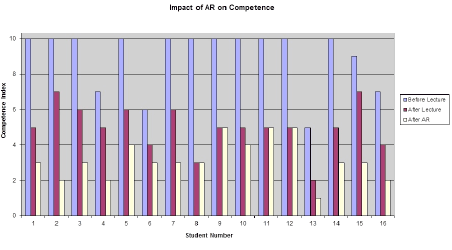
“This was the first trial of using AR here at the College for a single target group. The results gained from the feedback are certainly encouraging. With regard to the five points outlined in the overview for the project, I feel these have all at least in part proved worthwhile as criteria for inclusion in future augmented reality project work.” (Barry Spence 2013)

Case Study 3: University of Exeter - Unlocking the Hidden Curriculum

One of the first uses of augmented reality in education was by University of Exeter. Unlocking the Hidden Curriculum was a Jisc funded project from 2010/11.

http://blogs.exeter.ac.uk/augmentedreality/

The main campus of the University of Exeter is built on a country estate overlooking the city and surrounding countryside. The campus includes a variety of distinctive habitats and is rich in biodiversity. Students and grounds staff have regularly collected data through their programmes of study and conservation activities but this information and knowledge has hitherto remained hidden from the wider community.

The project will enable the campus to function as a ‘living laboratory’ and reveal a dynamic landscape of flora and fauna at any time of day or season to a variety of audiences who wish to interact with this unique location. Using Augmented Reality, the campus will be transformed into an accessible learning resource to support the formal and informal curriculum. Scientific data will be presented in a creative way to interpret the living landscape and promote engagement with Education for Sustainable
Development (ESD).
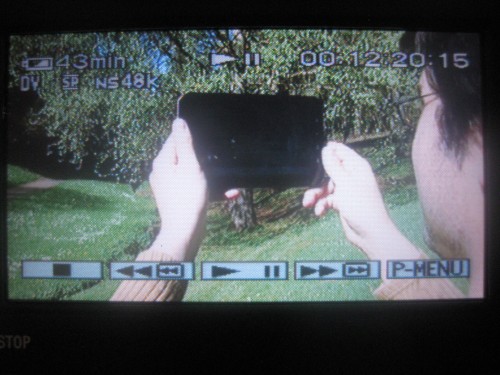
Visitors to the campus equipped with suitable smartphones/tablet devices will be able to trigger information presented as rich visual and audio media as they explore a variety of habitats and areas of particular interest. This location-specific information appears as an overlay superimposed on a viewing screen fed by the smartphone’s built in camera. (Project website: http://blogs.exeter.ac.uk/augmentedreality/about/)

Below is a video showcasing the Biodiversity data using the Layar application.


Two of these three case studies use augmented reality in an immersive fashion. Both University of Manchester’s Mimas team with Project Scarlet and the University of Exeter and their Unlocking the Hidden Curriculum take the end user out of their normal environment.

This allows for modification and redefinition of the learning activities, whereas the Bromley College example acts as a substitution of the activity. According to the SAMR model Puentedura (2009) the technology acts as a direct tool substitute, with no functional change.

It would be possible for the Bromley College example to completed without the addition of the augmented reality, although this is the case, it does still give a ‘wow’ factor.

What do you need to consider if you wish to use Augmented Reality in your teaching?

As previously mentioned the pace of change in technology is very fast moving. This has meant that authoring augmented reality applications has been getting easier with each iteration of the software tools.

We are now in a position where you do not need to be a computer programmer or web developer to be able to make some very interesting ‘AR’ materials. Once a platform has been chosen - here at UCS, Aurasma has been the platform of choice - there are two key requirements;
  1. An effective and appropriate Learning Design
  2. Required multimedia and web based resources
AR is just another tool that can be used, as with other tools learning design is king. The activity/resource must be thought through, learning outcomes decided. Planning the use of materials will allow you to think through how you want it to work, and if AR is actually the most effective technology to use.

The actual creation of the augmented reality materials is now all done through a web site. Following a few easy steps means you can create some really exciting materials. For example the workflow below shows the limited number of steps to go from having a couple of resources. One acting as the ‘trigger’ - what your devices recognises and the other as the ‘overlay’ - the action that happens once the trigger is recognised (for example a video plays when a photograph is recognised.


This video shows how easy Aurasma is to author. The video shows how to add a trigger image and overlay video, and then how to make the system recognise them - creating the ‘aura’, which is the name given to process of a trigger image being recognised and the action of the overlay playing.


What are we focussing on at UCS?

An area that has been popular with lecturing staff have been research posters. A number of lecturers have approached the Elevate Team to help develop interactive posters, there have been two main reasons for this.
  1. To included multimedia material
  2. To allow more information if the poster is unaccompanied
Being able to stand in front of a poster, hold up a mobile device to receive a video of the researcher talking through their methodologies or sharing their conclusions, really does bring the materials to life. Below is a link to a Research Poster that went to a national conference. Rather than showing video, this poster triggers audio recordings of students discussing their course. To accompany the audio, keywords from the audio are displayed,

Conference Poster: 


To move this along from being a just passive onlooker, we have been looking at ways of creating more interaction, to engage the cognitive processes. Using ‘overlay sequencing’ in the Aurasma developer studio means we are able to create individual pathways through the materials. In essence we are able have different clickable hot spots in the digital material. This allows us to create quiz questions, that the users selects the answer on screen, to then reveal further digital material.

One example we have created so far is a lecturer posing a question, with multiple choice answers appearing on screen, the user then selects their answer. Another video can then be played giving feedback for the previous answer. Further questions can then be asked, or the user can be directed to more resources. A demonstration of a prototype of this in is below:


The intention in the future is to further develop this approach and combining the approach and lessons learnt from the work at Bromley College.

Conclusion

Looking at the use cases here at UCS and case studies wider afield, augmented reality has not become mainstream as yet. Currently there is a need to find that “killer” application for the technology. One use that will capture the creativity of the subject and lecturers. The one that captures the enthusiasm of the learners, but still has a proven learning design and pedagogical values.

One hope for the future is that an Open Standard for Augmented Reality platforms can be found. This would mean that you are not tied into one platform from one supplier. Currently there are a number of platforms, if you develop your content in one of those, it is not possible for it to be accessed via the others. This would require a huge leap forward, but an Open Standard would also make future use more appealing.

References

Carmigniani , J. ; Furht , B. ; Anisetti , M. ; Ceravolo , P. ; Damiani , E. ; and Ivkovic , M. (2011) Augmented Reality Technologies, Systems and Applications. Multimedia Tools and Applications 51 , no. 1 : 341 – 477 (Accessed: 31 January 2014)

Vaughan-Nichols , S.J. (2009) Augmented Reality: No Longer a Novelty. Computer 42 , no. 12 : 19 – 22 (Accessed: 31 January 2014)

SCARLET (Special Collections using Augmented Reality to Enhance Learning and Teaching) (2013) Available at: http://teamscarlet.wordpress.com/category/mimas (Accessed 6 March 2014)

Mimas Powering Knowledge (2014) Available at: http://mimas.ac.uk/portfolio/scarlet/ (Accessed 6 March 2014)

Fragment of St. John's gospel. Available at http://www.library.manchester.ac.uk/searchresources/guidetospecialcollections/stjohnfragment/ (accessed: 6 March 2014)

Tuesday, 22 October 2013

AR Developments - Engaging the Cognitive Processes

What is it?


Augmented Reality (AR) is the layering of digital information over a real time, live view of objects in the real world.

This digital information can be text-based, images, videos and 3D models, any content that is digitally available has the ability to be overlaid. This technology has the potential to enhance the users’ experiences by combining real and digital information on today’s smartphones and tablets.

What have we been doing?


Here at UCS we have been looking at AR and its uses since mid 2011, the Elevate Team were on a development sprint looking at location (GPS) based layering of digital material. We were using the Layar tool to allow visitors to the Ipswich Wet Dock to find out more information about UCS and its waterfront campus.

Visitors could download the app and subscribe to our channel, allowing them to view the surrounding area through the screen of their smartphone or tablet, this would overlay information about the buildings they were looking at. Due to the technologies in the smartphone/tablet the app would know where they are and in what direction they were looking. We could then plot via GPS what buildings were where and then display certain information about those buildings.

For instance, when looking towards the Library building, the user would be made aware that it was the Library building, what the opening times were, links to the Library’s communications channels and if the user was staff or student, they could search the catalogue.

The last day of this development sprint was set aside for further research. This is when we came across a beta release of a tool called “Aurasma”. Aurasma refers to itself as a visual browser, using mobile devices cameras and image recognition technology to overlay digital content.

Previous AR developments were based around “markers”, meaning you needed a very bold/contrasting icon style image for computer cameras to recognise. With the fast paced developments in mobile technologies and the processing power this brings, companies have been able to develop markerless tracking, known as “Natural Feature Tracking”. This means that image recognition technologies can identify everyday objects as markers, and therefore trigger a reaction within the app.

UCS was one of the first institutions to launch a prospectus with embedded digital content. Prospective students could pick up a copy of the prospectus, download a free app and then hold their mobile device over certain pages of the prospectus (where indicated) and they would have videos play to give more information. An advertising video is available here.

The Elevate Team took the work they had done with the Marketing Team in the prospectus and wanted to engage more with the academic teams. This work progressed into embedding videos in academic research posters. A number of these posters have been produced and one has won ‘best poster’ at an International Radiography conference.


Where are we now?


We have been thinking about ways in which we can take this technology a little further and to really use it in a teaching and learning setting.

We want to really enhance the student experience and to engage with their cognitive processes, getting them to think. We have been looking at developing small learning objects that can be used with mobile devices. Below is a video of a sample learning object that engages with students on a different level.


We no longer have a video that you simply watch and then move on from, we have included responses after the video in the form of a multiple choice answer question.

As you can see in the video, an image on the poster triggers a video to play. The video is someone asking a question of the viewer. The viewer is then able to make a decision/answer the question, which is then responded to in the video. In this instance, the video tells you if you are correct or incorrect and then shows some further feedback in the form of a further video. The video then goes on to show a further question popping up, this question takes you to a form to fill in, giving text based answers/feedback. This information is stored outside of the app, which is accessible to the quiz owner.

This example shows one question and feedback loop, but it is just as easier to create multiple questions, creating individual pathways through the materials if that was required.

This is another tool in our armoury and again, learning design is king.