Friday, 27 February 2015

A blog about a project...

A blog about a project…
Hardly a captivating title but that’s pretty much what this is.  As the first Graduate Trainee taken on in UCS Learning Services I have been charged with developing a project that will encourage student engagement within Learning Services.  After discussions with Ellen Buck (Head of Learning Services) I opted to research the development & delivery of a SOOC (Small Open Online Course).  The SOOC would take the form of a 20 minute tutorial that would provide students with skills to enable them to undertake essay writing in a much more effective way.  As a UCS History graduate this was an area completely out of my comfort & knowledge zone but as Ellen reminded me my post within Learning Services was as much about my continued learning journey as it was about just coming to work & doing a job.

Areas of research have included cost & ease of installation, ability to incorporate the multi-media requirements & interactivity to keep it interesting & engaging for students, ease of use for students & accessibility across the board for all students including students with disabilities or specific learning difficulties.  Once the research was complete a suitable software platform was needed.  It was Sarah Robinson (Academic Skills & Resources Manager) that put forward the idea of Xerte, discussion with David Mullett & Aaron Burrell (UCS E-learning developers) confirmed that this would be the best & most accessible platform (plus Xerte is free to use!!). David & Aaron loaded Xerte onto the UCS computer system & gave me a quick tutorial on how to use it.  Sarah also provided me with some crib sheets & further guidance on the ‘building of things’ on Xerte.

The next step was laying out the story boards for the tutorial content.  Fabulous help & support with this was provided by Becky Blunk (Academic Liaison Librarian).  With the storyboard completed for the first tutorial it was on to Xerte & commencing the building!  This has not been easy & I feel like I have gone round the houses a bit to get as far as I have but we are on our way & all being well within the next couple of weeks we should have the first of the four complete & usable UCS SOOC’s.  Follow up blogs on this project will contain a link for individuals to have a go & hopefully feed-back how useful they think they are.   Although I have used the term SOOC during this blog, in the wider academic world the resources are more probably an Open Educational Resource (OER) & will be used as such, OERs are high-quality, openly licensed, online educational materials that offer an opportunity for people everywhere to share, use, and reuse knowledge, (thanks to Andy Ramsden, E-Learning development Manager for sharing his knowledge in this field). The great thing about this project is that it also feeds into the wider UCS vision & compliments the work of the pilot group being led by Kay Thompson (Quality Project Manager) that is currently looking at effective student guides.

Ellen was right; this project has been excellent to be part of.  I have & continue to develop new skills that will enable me to contribute fully to the Learning Services team.  However, one thing I am acutely aware of is just how well the Learning Services team work together.  Lots of people have been & continue to be involved in this project, my colleagues have been supportive & generous with their time when helping me work my way through this new area of learning.  It is definitely another string to my bow with the arrows & quivers being provided by my colleagues.  Team Learning Services rock!!

Thursday, 26 February 2015

Holywells Park AR Project

IMG_8457.JPG
Holywells Park stables
The Elevate Team have been working closely with the Holywells Park Heritage Lottery Funded project run by Ipswich Borough Council.

The project is restoring some of the original features to the park as well as making more of its history available to the visiting public. We are supporting the project by offering our technical expertise around the use and creation of location aware activities.

We are developing two activities for the park and supporting the UCS students on a third. The two activities we are developing are both utilising augmented reality to bring the park to life. The first is a learning activity that augments video-based material over a static information board near the parks water feature.


The scenario is:

A park visitor has been and visited the information point and see the advertising material mentioning the hidden digital materials around the park, they have downloaded the required app to their smartphone.

They have walked to the water feature and looked at the information board, explaining some of the features of the pond, and what creatures they might see. They have noticed the icon on the board that indicates there is more to find out. They load the app on their smartphone and then they view the board on their phones screen.

The board then comes to life, with a video displaying over the board, and the video asks them if they would like to participate in a quick quiz. The person then touches the ‘yes’ button their phone screen. The video then displays some information and asks them a question about what they have just heard. Buttons appear on the screen and they can then choose an answer. The video will then tell them the if they are correct, and it will ask if they would like further information.

The second activity we are working on is a GPS based ‘Tree Trail’, where park visitors will be able to use their smart devices to view the park and find out about the trees and features around the park. If the visitor has the app open when they walk near one of these features they will be alerted by an audio introduction, when they can then find out more information.

Ipswich Borough Council are using a drone to video fly-throughs of the park. With the drone taking off and filming along the paths, these videos will be used to augment over another one of the information boards. Drones an area of interest to us as we believe they have great potential in other areas of working with the UCS Heritage team.

One thing we need to be careful of with the use of all this technology in an open space is, mobile signal and its strength. The new information point and cafe that are in the newly refurbished stables will have free wifi. We have spoken with the project manager about how they might extend this into the park. Extending the wifi is an option, but not one that will be 100% successful, to this end we undertook a mobile phone signal survey all around the park. Signal strength and speed tests were run at all points of interest in the park. These results were very encouraging as the area is now covered by 4G by two of the major operators, the others offered a fast 3G services.
IMG_8479.JPG
Mobile phone signal survey

We are very exciting to be working with Ipswich Borough Council on such an innovative project and we will update this blog over the coming weeks and months.


Sharing good practice: PSYC Routes: Online marking, moderation and feedback guide

We'd like to share the following piece of good practice from the PSYC Routes around online marking, moderation and feedback. A big thank you to David James for agreeing to allow us to share it.

Most written assignments for PSYC routes are marked online, within LearnUCS. The linked file discusses how the academic team have developed guidance around online marking, moderation and feedback. 

If you would like to discuss how you might include this good practice, as an individual or across a team, please contact the Elevate Team (elevate@ucs.ac.uk).


With thanks: Images: http://www.vipkatwijk.nl/userfiles/database_good_practice.jpg

Tuesday, 17 February 2015

Mahara Upgrade Complete

UCS' e-Portfolio system, Mahara, was successfully upgraded this morning to the latest stable version 1.10.2.

The upgrade went smoothly with only 10 minutes of downtime at 8:15am.

After our testing and checks, Mahara is now back open for staff and students to use.

If you are a student and wish to utilise Mahara to keep an e-Portfolio or a reflective journal, simply head over to http://mahara.ucs.ac.uk and register for a new account using your UCS email address.

If you are a staff member who would like to use Mahara with your students, please contact the Elevate Team in Learning Services - elevate@ucs.ac.uk

Future blog posts will detail some of the new features and functions.


Monday, 16 February 2015

Mahara Upgrade Tomorrow!

This is the last reminder that UCS' e-Portfolio system, Mahara, is being upgraded to the latest stable version (1.10.2) Tuesday 17th of February between 7am and 9am.

The whole of Tuesday is seen as an at risk period and it is advised to only use Mahara after we have verified the upgrade has been successful and have completed all of our testing.

If you wish to view some of the new features the new version brings, please follow the link below:

https://mahara.org/features


Friday, 13 February 2015

Flipping in study skills: ICT Literacies for Science Students

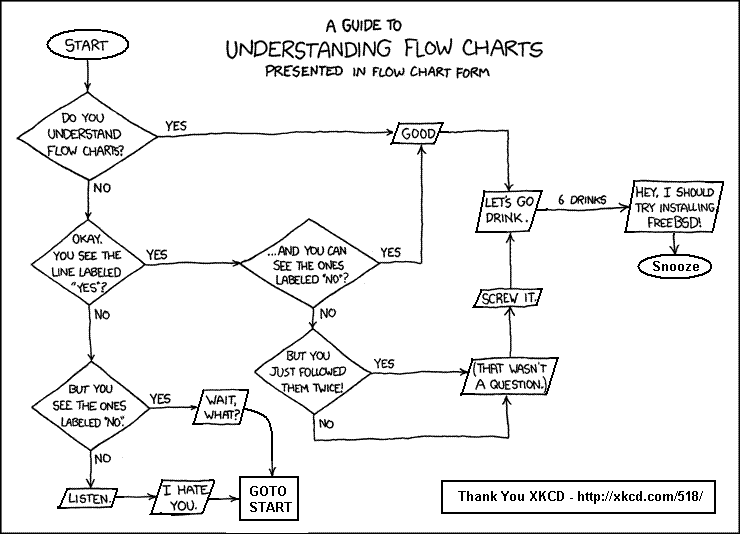
The following describes the latest iteration in our flipped classroom approach for the effective deployment of study skills within curriculum. This outlines the need to ensure students had the skills and competencies to create flow diagrams (decision trees), as they need to apply them in an assessed piece of work on Biology of Disease (Level 5 module).

In the previous year, this session was run as a two hour computer based Microsoft Visio workshop for around 40 students.

However, we have been challenging this traditional model, on a number of issues;
  1. is this really the most effective way to teach some one how to create a flow diagram?
  2. it doesn't account for their previous knowledge and skills. Why does a person need to attend a teaching session if they already have the skills, and can demonstrate them? Surely, we should focus our limited resources on those who need the greatest help?
  3. in the increasingly fluid, cloud based, "world of software", should we be so prescriptive about the software they have to use? Surely, we should develop their digital literacies to enable them to make appropriate and informed choices which align with their needs.
Firstly, I'd like to thank Tom Ranson (e-Learning, UCS Science & Technology) for co-developing this implementation.

What did we do and why?

The following learning design outlines the workflow. The embedded video walks through the online aspect.


How did the online learners find the learning experience?

Very encouragingly, 29 completed the pre-session activity, and eight attended the face to face workshop (13 students were invited to attend given they'd not submitted).

A short follow up survey was undertaken for those who submitted online. There was a response rate of 28% (8 out of 29), so the caveat holds, take the following with a pinch of salt. The survey results indicated "their knowledge and skills of using the software to create flow diagrams has improved since completing the online activity" (3 strongly agreed, 5 agreed). This was against a backdrop of 6 out of 8 respondents never having created a flow diagram using software (such as visio, powerpoint etc).

Overall, when asked, having completed the online activity, how would you prefer to learn the skills,
  • seven opted for completing the online activity to cover the skills
  • one opted for attending a one hour workshop to cover the skills
When asked to justify their answers, the majority of responses can be summed up as;
  • "I feel the online activity was sufficient for me personally, as I felt the background learning (self-study) helped me to understand the process"
  • "I don't feel I need to attend the workshop as I have learnt independently enough to use visio to my requirements"
The response which would have preferred the workshop was the need to ask questions and address any difficulties faced. This theme was mirrored in discussions with those who attended the face to face workshop. Where (2 out of 8) made reference to broader ICT digital literacies, so preferred to have the safety net of a facilitated session to gain the required skills.

How can we improve it?

The current position has been an iterative development of implementations in other subject areas. Therefore, the overarching learning design is fine. On reflection, areas of further improvement would include;

  1. clearer instructions on the choice they need to make in terms of the delivery style. When we discussed with the group who attended the workshop, a common theme was they were not aware of the online option (2 out of 8), while some thought the face to face would best because they might have questions which need answering (2 out of 8). More effective communication and expectation management at the start of the activity might have meant these people would have completed online.
  2. encourage more flexibility in terms of the flow diagram they can create. Our expectations where they'd submit a flow diagram which looked like the one we provided, plus some personalisation. Interestingly, very few actually submitted the suggest flow diagram, and either an iteration of their assignment or topics aligned to their decisions. However, these all meet the requirements. Therefore, for next year, we will relax the conditions, and allow them to submit a decision flow diagram on any topic.
  3. feedback from the online survey indicated some people spent a significant time researching the meanings of the different shapes used in a decision tree / flow diagram. For next year we'll explore the inclusion of FAQs around what do the different boxes mean.

If you have any questions, about how Learning Services at UCS can help include study skills into your course, please email us.


With thanks - Image - http://reviseomatic.org/help/g-flow-charts/Flow_charts_xkcd.GIF

Mahara Upgrade - New Features Spotlight

With UCS' e-Portfolio system (Mahara) being upgraded next week on Tuesday 17th of February between 7am-9am, we thought we would take this opportunity to focus on a key new feature/change that will come with the upgrade.

This new feature is the updated easy to use drag and drop navigation for editing portfolio pages.

Currently you have a set of tabs which run horizontally across the screen with icons depicting elements which you can use in your portfolio page. There is then a quite small area below where you drag those icons.


This has proved to be a little confusing at times, especially users who are working in Internet Explorer or those who have smaller screen resolutions.

The new interface condenses the elements into more readable text rather than icons for quicker navigation and a larger working area to the right of the menu.

This is how the new portfolio page editing will look like:


As you can see from the image above, the design is a lot easier to read and hopefully in a more sensible area to work with.

If you wish to get a head start with some of the changes and what they mean to you, here is a link to Mahara's support pages of the new version.

http://manual.mahara.org/en/1.10/index.html